
TL;DR:
- 📍 Let's Connect: Shanghai event recap, plus updates on our upcoming University Events.
- ⚡ What's New: Unlocking direct Agentic SVG generation inside your chat workflow.
- 📖 In the Wild: How one bookkeeper transformed two years of scattered AI chats into one local sanctuary.
- 💡 Did You Know?: A 3-step guide to syncing your browser chat histories directly into MemoryBox using our extension.
Let's Connect
Where we've been & where we're meeting up next
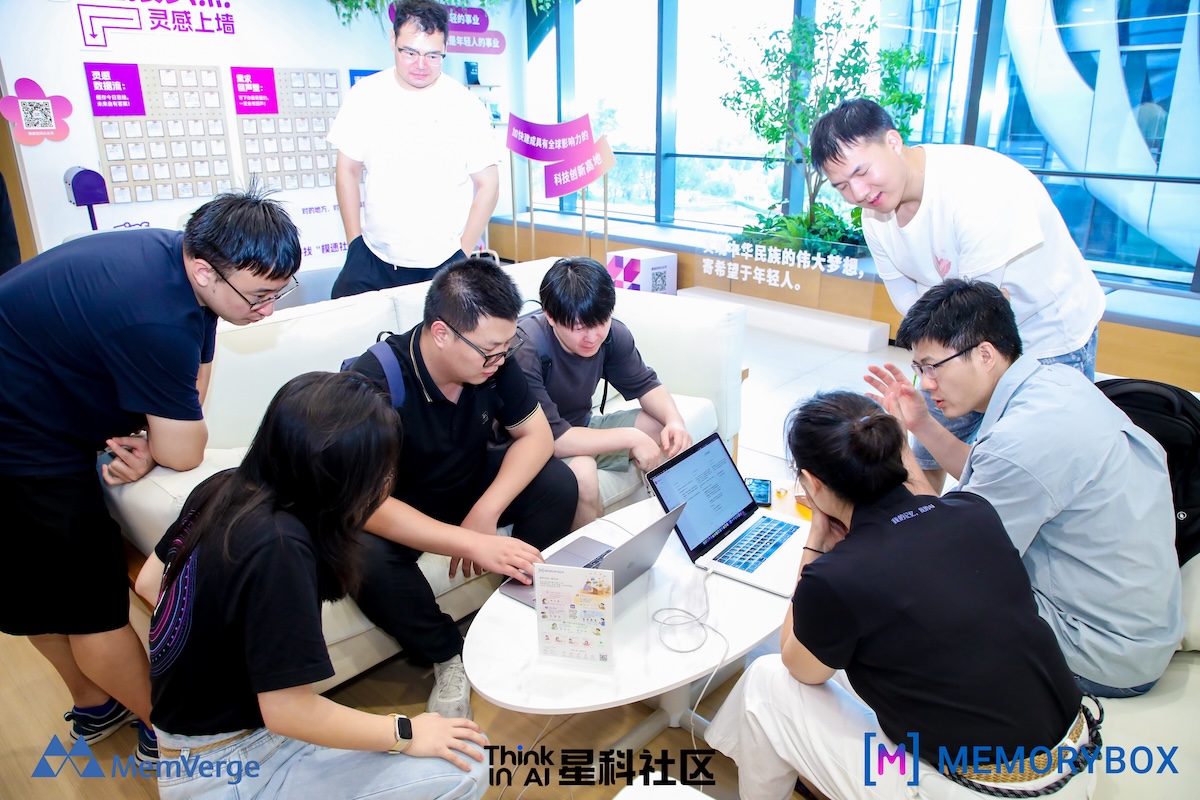
Shanghai Launch: Planting seeds of local memory
At our recent Shanghai gathering, we welcomed our local community for an evening focused on the future of AI and memory sovereignty.
To anchor the event, we gave every attendee a MintBox containing mint seeds. Amid today’s high-speed information flow and rapid model releases, we deliberately chose something slow—a seed that requires patience to take root.
Memory works much the same way. A single thought, raw document, or quick spark captured today doesn't yield instant results; it settles, connects, and matures into personal knowledge unique to you. MemoryBox isn't a static cloud hard drive—it is fertile, local ground where your personal memory can continuously grow.
On our Memory Wall, we asked: If AI could permanently remember just one thing about you, what would you want it to be? The handwritten notes were striking—reflecting a shared desire for technology that remembers our values and long-term context rather than treating us like strangers on every new login.
During the panel, Charles and guest speakers explored AI's next decade. The consensus was clear: as models become commodity engines, the real value shifts to the privacy, depth, and ownership of the context you bring to them.
Thank you to everyone who came out to plant a seed with us.
What should your workspace permanently remember about your craft? Join the discussion on our MemoryBox Subreddit.
What's Next: University Events & Internships
We spend so much time adapting to new models that it is easy to forget where the real breakthroughs happen. They do not come from typing faster into a blank prompt box. They happen when young builders sit down, take ownership of their context, and decide how technology should remember them.
If you have ever felt the frustration of starting from scratch every time you open an AI tool, we want to help you fix it. This fall, we are heading to campuses across both coasts to meet the students and creators who want to help build the future of local-first memory sovereignty.
We are holding a series of campus events where you can connect with our team, explore internship opportunities at MemVerge, and get hands-on experience with MemoryBox.
| University & Event | Location | Date & Time |
|---|---|---|
| UCLA | Los Angeles, CA | Tue, Oct 6, 2026 | 3:00 PM – 7:00 PM PDT |
| NYU Careers in Technology Fair |
New York City, NY | Fri, Oct 9, 2026 | 11:00 AM – 3:00 PM EDT |
| Cooper Union Job & Internship Fair |
New York City, NY | Tue, Oct 13, 2026 | 9:00 AM – 11:00 AM EDT |
| Caltech | Pasadena, CA | Thu, Oct 15, 2026 | 12:00 PM – 2:00 PM PDT |
Note: Time zones for Cooper Union and Caltech have been normalized to local campus time (EDT/PDT).
Whether you want to build native local connectors, optimize multi-model context routing, or simply chat about privacy-first workspace design, come drop by our booth.
Want to reserve a spot early, ask about specific roles, or suggest a campus visit for the spring? Drop us a note at jon@memverge.com or join the conversation on our MemoryBox Subreddit.
What's New
Agentic SVG Generation: Direct Visual Workflows In Your Chat
Why limit your AI agents to static text or dropdown presets when you can render dynamic visuals on the fly?
Most AI workflows treat visual generation as a separate, rigid feature. If you want a custom diagram, architecture flow, or UI mockup, you usually have to select a restrictive tool preset or switch platforms entirely.
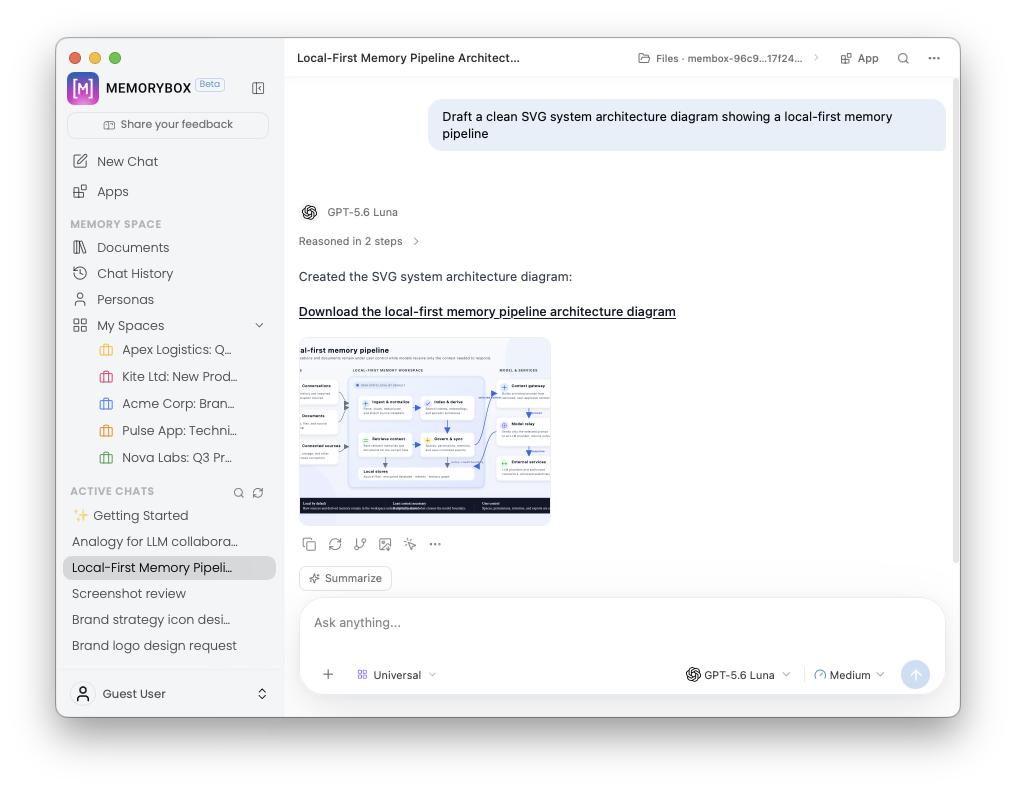
MemoryBox changes where your visual workflow begins. Our updated agentic engine can now generate, render, and refine clean SVG vector graphics directly inside your active chat thread.
|
Don't Limit Yourself to Presets You don't need a special dropdown or predefined button to tap into this power. You can prompt our agents directly in natural conversational prose:
|
|
The agent interprets your context, builds the raw vector graphic, and renders the visual inline—so you can inspect, prompt for adjustments, and refine the visual layer in real time without leaving your thread.
Your ideation isn't limited to plain text. Prompt your canvas directly and let your ideas take shape visually.
![Image Generated in [M] with the prompt "Generate a single image of my two dogs (photos attached), illustrated as comic book superheroes."](https://api.mmcloud.io/media/upload/202609/260909152943274120.jpeg)
Coming Soon: Beta 2 is right around the corner—bringing dedicated MemoryBox Apps, native local Connectors, and custom agent Skills straight to your local workspace.
In the Wild
How one bookkeeper unified months of fragmented AI chats into one local engine
I chatted with a freelance bookkeeper named Michelle last week, and she described a frustration almost every independent professional eventually runs into.
Over the past two years, as she brought her client workflows up to speed across digital platforms like QuickBooks and FreshBooks, she relied heavily on AI to draft client communications, parse new software guidelines, and structure financial reporting templates. But her setup was completely fragmented. Her best prompts, client background context, and software troubleshooting notes were scattered across ChatGPT, Claude, and Gemini.
As Michelle put it: "My workspace felt like a high school locker after midterms—months of valuable notes, client rules, and past ideas just jammed inside, completely lost the moment I actually needed to retrieve them."
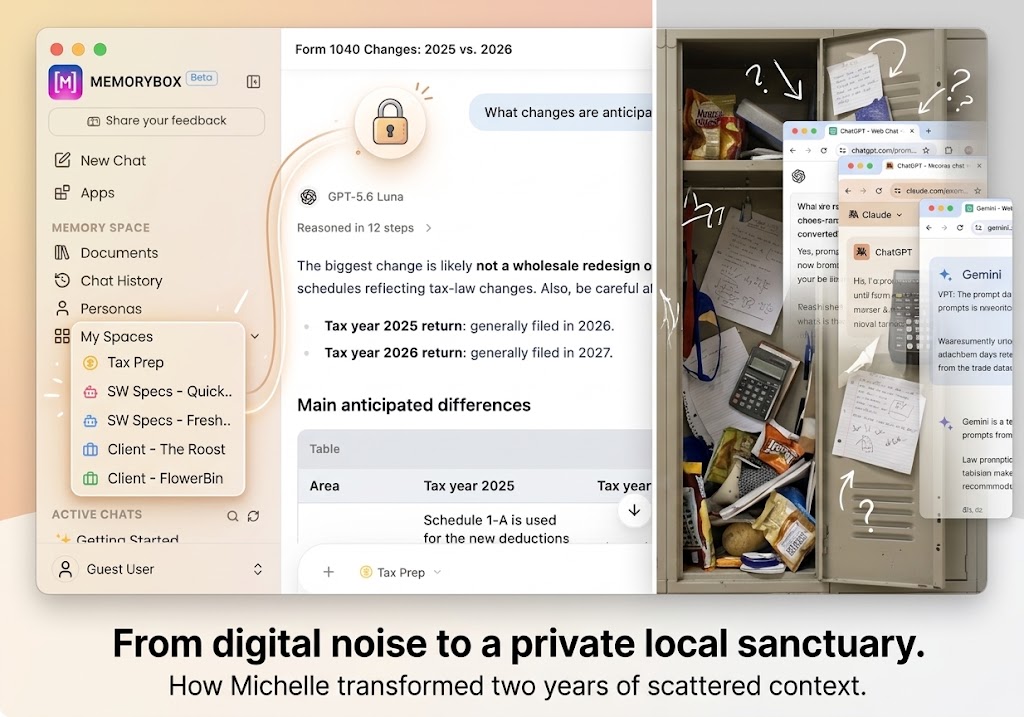
Whenever a new tax season or software update hit, she spent twenty minutes digging through old chat logs just to find a single prompt framework or re-explain her accounting rules from scratch.
That mental friction—the quiet drain of searching for your own past thinking—is why we made adopting MemoryBox completely painless for existing AI users. You don't have to abandon your past work or start over.
Using the MemoryBox Extension, Michelle synced her entire browser chat history directly into a private, local-first workspace on her machine. In just a few clicks, two years of scattered context transformed into a clean, searchable ideation layer.
Now, before she writes a single prompt, MemoryBox grounds her past insights, keeps her client environments and personal accounting mindsets completely distinct without context leakage, and lets her push clean context to whichever model she chooses to use that day.
Your memory is a private sanctuary. It lives locally on your machine—your memory, your rules. When your history stays where it belongs, you stop searching through digital noise and start building right from where you left off.
How are you managing your historical chats across different AI tools? Join the discussion on our MemoryBox Subreddit—we'd love to see your setup!
Did You Know?
How to sync your chat histories across multiple tools using the MemoryBox Extension
Have you ever noticed how much energy gets lost when you try to move a project from one AI tool to another?
You build up months of rich context across ChatGPT, Claude, Gemini, or DeepSeek, but the moment you open a new window, you're back to square one. Moving that history manually feels tedious, so your best ideas, client background, and software rules end up trapped inside isolated browser tabs.
You shouldn't have to leave your past work behind just to start fresh.
The MemoryBox Extension bridges your scattered web chats directly into your desktop sanctuary. In three simple steps, you can pull your existing conversation threads straight into private, local workspaces—grounding your historical context on your own machine so it's instantly available whenever you ideate next.
|
Step 1: Link Extension 
|
Step 2: Capture Thread 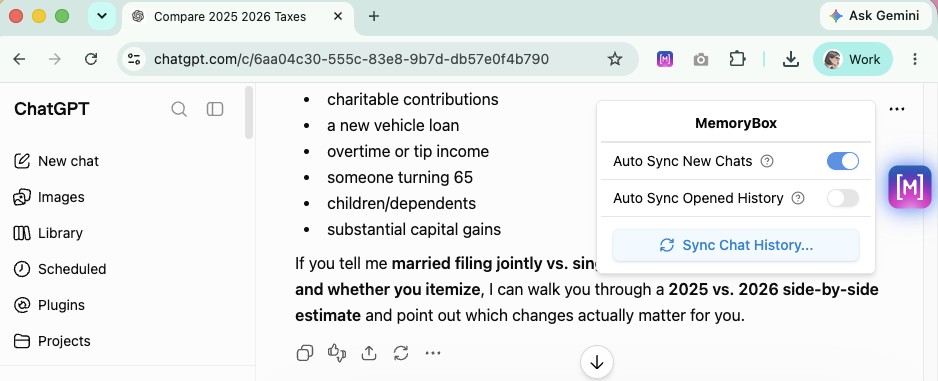
|
Step 3: Map to Local Space 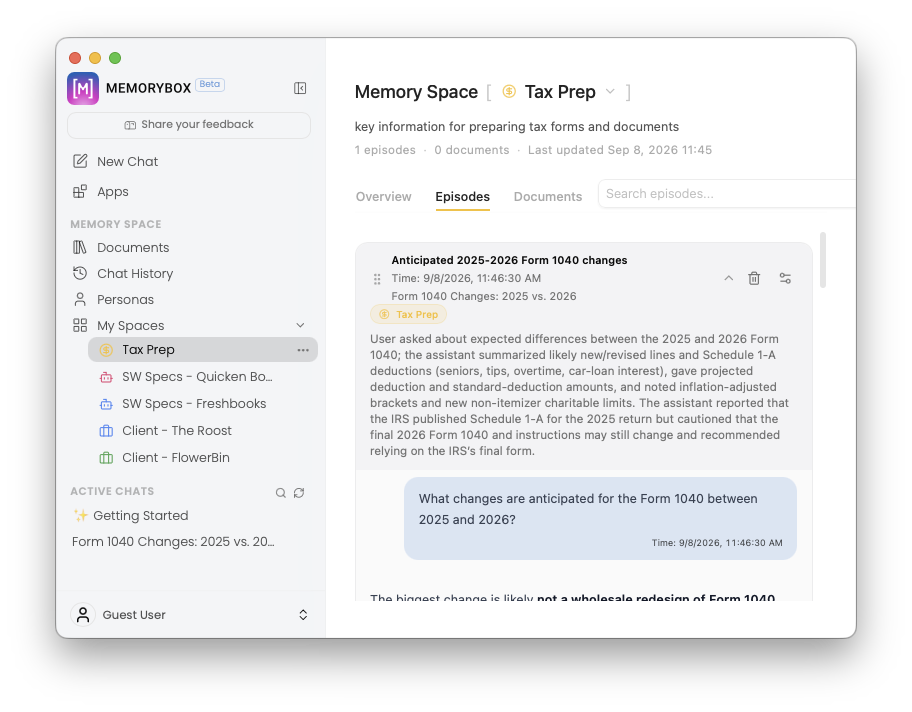
|
- Install & Link the Extension: Ensure the MemoryBox browser extension is active and connected to your local desktop application.
- Select Your Target Threads: Open your web AI client of choice (ChatGPT, Claude, Gemini, DeepSeek, etc.), open the specific conversation thread containing your core project context, and click the MemoryBox extension icon to initiate the capture.
- Assign to a Local Workspace: Map the incoming conversation to a dedicated local environment (e.g., Client - FlowerBin or Tax Prep). MemoryBox indexes the historical context locally on your machine—keeping your data strictly private while making it immediately available for future ideation sessions across any model.
Instead of starting every conversation from scratch, you get a continuous, local repository of your entire thought process.
Different platforms. One continuous flow. Own your memory, own your craft.
Want a full step-by-step walkthrough on configuring the browser extension? Check out our Extension Sync Guide in our Docs.