
TL;DR:
- 📍 Let's Connect: Fall University Tour & Student Builder Workshops.
- ⚡ What's New: Earn Credits as You Build: Introducing the MemoryBox Refer a Friend Program
- 📖 In the Wild: Medical decision-making without cloud risk: How Alex navigated ACL recovery.
- 💡 Did You Know?: Automatic local knowledge updates with File Monitoring.
Let's Connect
What's Next: University Events & Internships
We spend so much time adapting to new models that it is easy to forget where the real breakthroughs happen. They do not come from typing faster into a blank prompt box. They happen when young builders sit down, take ownership of their context, and decide how technology should remember them.
If you have ever felt the frustration of starting from scratch every time you open an AI tool, we want to help you fix it. This fall, we are heading to campuses across both coasts to meet the students and creators who want to help build the future of local-first memory sovereignty.
We are holding a series of campus events where you can connect with our engineering team, explore internship opportunities at MemVerge, and get your hands directly on the codebase powering MemoryBox.
| University & Event | Location | Date & Time |
|---|---|---|
| UCLA | Los Angeles, CA | Tue, Oct 6, 2026 | 3:00 PM – 7:00 PM PDT |
| NYU Careers in Technology Fair |
New York City, NY | Fri, Oct 9, 2026 | 11:00 AM – 3:00 PM EDT |
| Cooper Union Job & Internship Fair |
New York City, NY | Tue, Oct 13, 2026 | 9:00 AM – 11:00 AM EDT |
| Caltech | Pasadena, CA | Thu, Oct 15, 2026 | 12:00 PM – 2:00 PM PDT |
Note: Time zones for Cooper Union and Caltech have been normalized to local campus time (EDT/PDT).
Whether you want to build native local connectors, optimize multi-model context routing, or simply chat about privacy-first workspace design, come drop by our booth.
Want to reserve a spot early, ask about specific roles, or suggest a campus visit for the spring? Drop us a note at jon@memorybox.ai or join the conversation on our MemoryBox Subreddit.
What's New
Announcing Beta 2: Reinforced Security, Mandatory Login & Smooth Guest Migration
Upgrading from our previous releases, this major milestone marks the official launch of Beta 2! This release stabilizes core memory lifecycles, expands multi-model execution, introduces desktop billing, and reinforces user data security.
Enhanced Security & Mandatory User Login
To ensure more private, secure interactions and enable seamless credit tracking, Beta 2 officially transitions away from Guest Mode. Requiring a user login allows MemoryBox to better protect your local workspace configurations and synchronize your plan capabilities without compromising your privacy.
Seamless Data Migration for Guest Users
We designed the transition to be effortless so no guest data is lost during the upgrade:
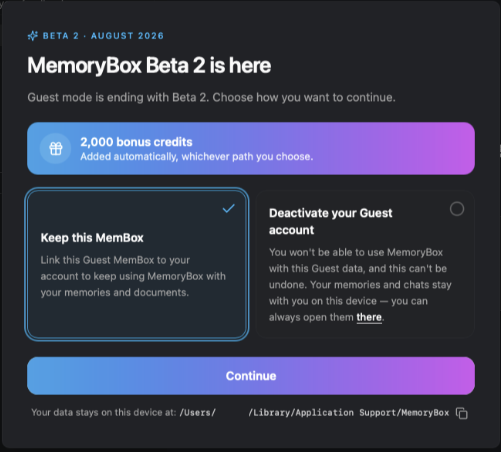
- Keep Your Context: When launching Beta 2 for the first time, you will be prompted to choose how to handle your existing Guest data. Selecting Keep this MemBox links your local guest memories, documents, and chats directly to your new authenticated account.
- Automatic Bonus Credits: Whichever transition path you choose, MemoryBox automatically deposits 20,000 bonus credits into your account to kickstart your upgraded workspace.
- Local Data Safety: Your files remain safely anchored on your local hardware at
/Users/[User]/Library/Application Support/MemoryBox.
Additional Beta 2 Highlights
- 🧠 Agent, Tools & Chat Experience: Eager tool streaming for Anthropic inputs, automatic document ingest requeuing (up to 5 retries) on empty turns, and instant session branching from failed turns. Includes inline
run_javascriptmath execution and dynamic SVG/PPTX chart rendering. - 💳 Credit Balance & Desktop Billing: Live tracking for plan credits, transaction histories, and monthly usage metrics under Settings → Billing, paired with an overhauled 10,000-credit referral reward scheme.
- 🔌 Expanded Connectors & Extensions: Read-only OneNote knowledge integrations on desktop and backported Firefox release channels for stabilized background history sync.
- 🛠️ Desktop Polish & System Maintenance: Isolated job queues to quarantine crashing app tasks, restricted SQLite database permissions, bounded renderer memory limits, and improved installer upgrade resilience.
In the Wild
Medical Decision-Making Without Cloud Risk: How Alex Navigated ACL Recovery
When an unexpected injury sidelines your goals, you need immediate answers to make critical medical decisions—like whether or not to undergo surgery.
Alex Morgan, a competitive marathon runner, felt that exact disruption when a twisting knee injury during a run left her unable to bear weight. Following an MRI, she received a complex diagnosis: a Grade III full-thickness ACL tear, a horizontal tear of the medial meniscus, and significant bone contusions.
Desperate to synthesize complex surgical notes, understand her multi-phase physical therapy milestones, and weigh treatment options, Alex wanted to leverage AI to translate the medical jargon into a clear recovery roadmap.
However, as she prepared to upload her MRI results and confidential medical history into a standard cloud chatbot, she hesitated. Who will ultimately have access to her private health history?
She was right to worry. The moment you upload sensitive health records to standard cloud AI portals, your private data is ingested into public servers and permanently retained to train corporate models. Your medical sovereignty is gone.
How MemoryBox Shifts the Power
Instead of exposing her medical history to the cloud, Alex created a dedicated Health & Recovery Memory Space inside MemoryBox on her laptop to ask questions regarding her Physical Therapy and Marathon Ambitions.
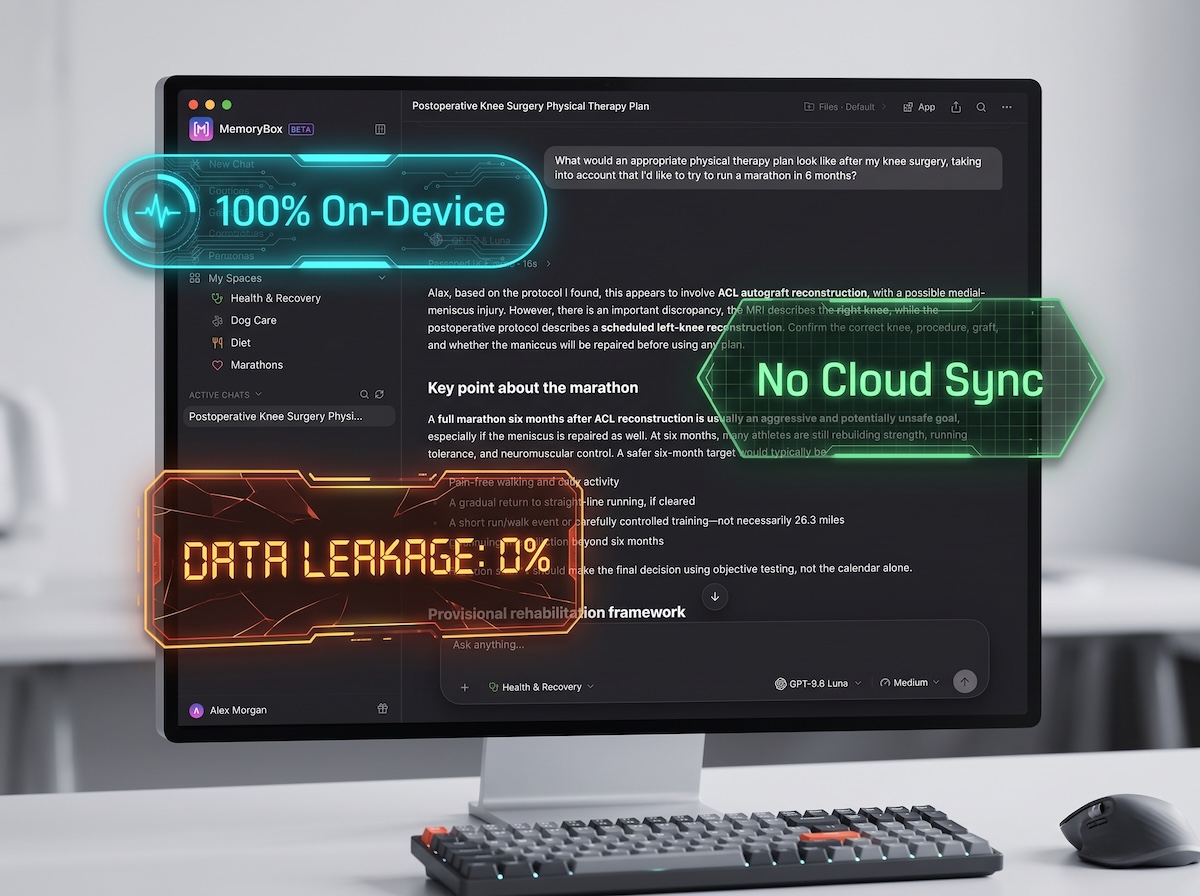
- Strict Local Processing: MemoryBox ensures sensitive files stay strictly within her local application.
- Zero Cloud Retainment: The AI parses her records securely on her device—meaning no public server ever retains, leaks, or uses her medical data.
- Grounded Recovery Milestones: From Phase I extension goals to Phase IV return-to-running timelines, Alex can query her records offline, catch critical medical discrepancies across her records (like conflicting left vs. right knee entries across docs), and evaluate conservative vs. surgical treatment paths safely.
By keeping her context grounded on her hardware, Alex took full control of her health roadmap—with complete peace of mind.
Your health. Your history. Your sovereignty. MemoryBox lets you own your AI memory.
Did You Know?
Automatic Knowledge Updates with Folder-Level File Monitoring
Ever saved an updated medical report, research draft, or new client PDF to a desktop folder and wished your AI was instantly aware of it?
With MemoryBox, you don’t need to re-upload files or manually refresh your workspace context. MemoryBox automatically tracks and monitors any ingested document or folder for changes. Whenever you save a new file or edit an existing document inside a monitored folder, MemoryBox ingests and indexes the new context locally—making it immediately available for your chats.
Here is how to set up folder monitoring in 3 simple steps:
- Add Your Source: Navigate to the Documents section on the left-side menu, click the blue + Add button in the top-right corner, and select Sync folders.
- Confirm Folder Monitoring: Select the folder on your machine you wish to monitor. A preview pop-up will appear summarizing the files and subfolders—simply click Start monitoring to confirm.
- Automatic Local Indexing: MemoryBox will process and index the folder context locally on your machine. Any future additions or file edits inside that folder will automatically sync into your MemoryBox context without ever leaving your device.
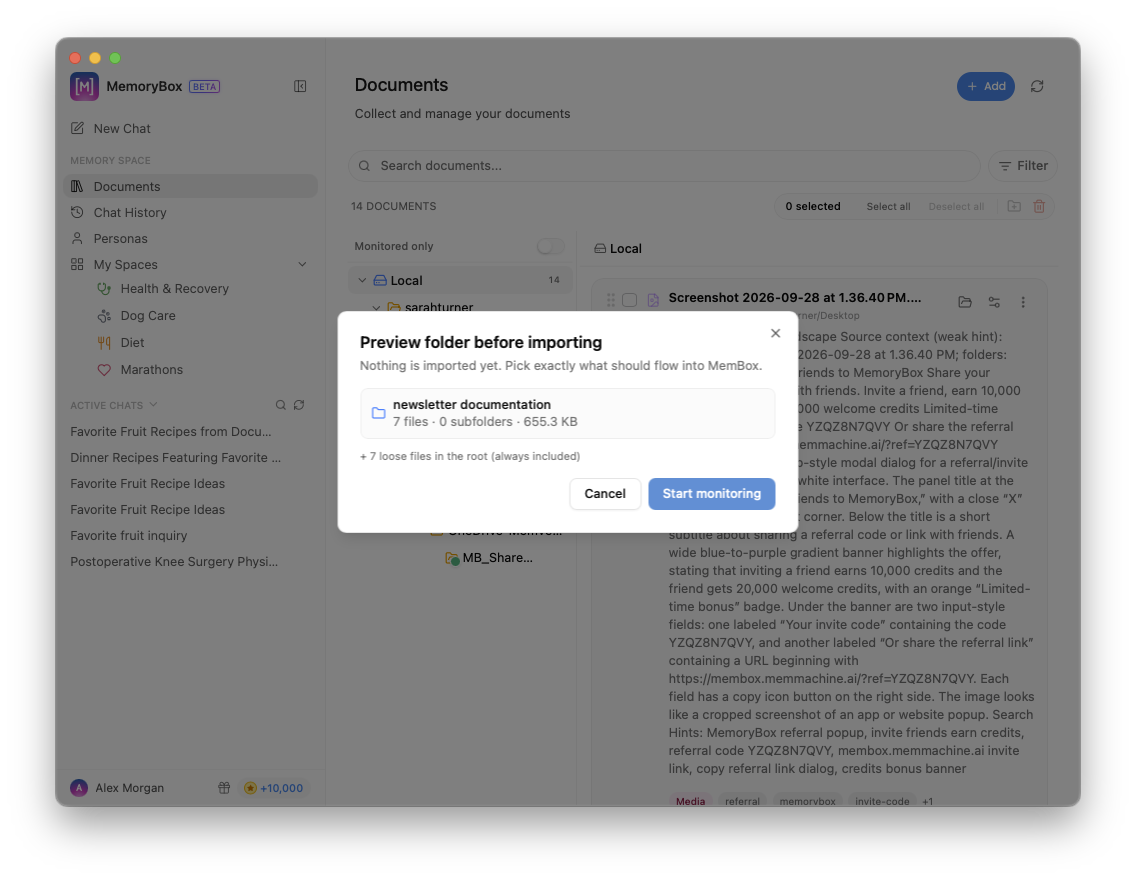
File monitoring keeps your AI context grounded in your latest local work—automatically and private to your device.